MVC

  • Home
  • HTML
    • Overview
    • Formatting
  • Java Script
    • Overview
    • Validation
  • CSS
    • Overview
  • Sql
    • Overview
    • SQL Select
    • SQL Command
    • Advance Query
    • SQL Create
    • Function
    • Function vs StoreProcedure
    • Stored Procedures
  • MVC
    • OverView
    • Evolution of MVC
    • Install VisualStudio-2015
    • Create First Application
  • LINQ
    • Introduction
  • Privacy Policy

Friday, 31 March 2017

What Is Store Procedure

  Unknown       08:26       StoredProcedures       No comments    

Stored Procedure in SQL Server can be defined as the set of logically group of SQL statement which are grouped to perform a specific task. We Use stored procedure is that it increases the performance of the database. stored procedures is that you can centralize data access logic into a single place that is then easy for DBA's to optimize. Stored procedures also have a security benefit in that you can grant execute rights to a stored procedure but the user will not need to have read/write permissions on the underlying tables. This is a good first step against SQL injection. </ br>

Create Store Procedure in SQL Server


Step 1 : Firstly Create Open Computer Serach SQl Server Click and Open.
Step 2 : Create Databse like in Example as below.
EX.
CREATE DATABASE Db_Employee

Step 3 : Write this command in Sql Server and Run (F5) This Command. We Use This Db .
USE Db_Employee

Step 4 : After that created Database Create New Table With Tbl_Employee Name.
Ex.
CREATE TABLE Tbl_Employee
(
Id int,
Name NVARCHAR(50)
)
Step 5 : Created Table Then Create Procedure as Below -

Syntex-

Create Procedure Sp_Name ( @paerameter ParameterType(Size) ) Write Sql Query

Example

In this example we will query the Tbl_Employee table from the Db_Employee database, but instead of getting back all records we will limit it to just a particular Employee. This example assumes there will be an exact match on the Employee value that is passed.
USE Db_Employee GO CREATE PROCEDURE dbo.SP_Employee @Name nvarchar(30) AS SELECT * FROM Tbl_Employee WHERE Name= @Name Note- Here SP_Employee Store Procedure Name @Name is a Parameter and we give Multiple Parameter also.

Execute of Store Procedure

EXEC SP_Employee @Name= 'Ram'

How TO Alter Store Procedure

Syntex- ALTER PROCEDURE Procedure_Name EXAMPLE ALTER PROCEDURE SP_Employee @Name= 'Ram'

Advantage Of Using Store Procedure

1. Using the Stored procedure is that it reduces the amount of information sent to the database server. 2.Compilation step is required only once when the stored procedure is created. Then after it does not require recompilation before executing unless it is modified and reutilizes the same execution plan whereas the SQL statements need to be compiled every time whenever it is sent for execution even if we send the same SQL statement every time. 3.Code Usability User Can Call Multiple time Store Procedure. 4.Using Store Procedure Maintain Security. 5.In SQL Server we have different types of stored procedures: System stored procedures User-defined stored procedures Extended stored Procedures System-stored procedures are stored in the master database and these start with a sp_ prefix. These procedures can be used to perform a variety of tasks to support SQL Server functions for external application calls in the system tables Example: sp_helptext [StoredProcedure_Name] User-defined stored procedures are usually stored in a user database and are typically designed to complete the tasks in the user database. While coding these procedures don’t use the sp_ prefix because if we use the sp_ prefix first, it will check the master database, and then it comes to user defined database. Extended stored procedures are the procedures that call functions from DLL files. Nowadays, extended stored procedures are depreciated for the reason it would be better to avoid using extended stored procedures.

Count number of words in string through function in SQL


In This article make a function in sql server to find out the how may time word occurrence in string and you can count how many words present in this string through function in sql server

CREATE FUNCTION fnCountOccurences      
               (@ShortString VARCHAR(100),      
                @LongString  VARCHAR(8000))      
RETURNS INT      
AS      
  BEGIN      
    DECLARE  @Text      VARCHAR(8000),      
             @Frequency INT      
          
    SET @Text = @LongString      
          
    SET @Text = REPLACE(@Text,@ShortString,'')      
          
    SET @Frequency = (len(rtrim(@LongString)) - len(rtrim(@Text)))      
                    / len(rtrim(@ShortString))      
          
    RETURN (@Frequency)      
  END

We Get OutPut:-

 SELECT[dbo].[fnCountOccurences](',','a,b,c,c,')
Execute
OutPut- 4


Read More
  • Share This:  
  •  Facebook
  •  Twitter
  •  Google+

Friday, 24 March 2017

Create First Application in MVC

  Unknown       11:28       CreateApplication       No comments    

We want to create Firstly application in MVC first of how we create first application Show Steps  as below-

   STEP 1. Start Computer and Install Visual Studio (Mention installation step in previous tab how to install)  Go start menu in Computer And Click on Installed Visual studio.Then Open Window like as- 
   Ex. 


Open This Window after processing next  window open like-
Ex.


STEP 2.  Create  new application select new project or We Also Select in file new project. 
                Click on  a new project.


STEP 3.  Choose Your Project Save Location and Select Asp.net web Application and click on button.Next Open window.


Select MVC and Click OK button Then open Application We See.


We see folder Model ,View and Controller. 
 Model   -  Right Click on Model folder and Add New Class .We Declare Property And Data type 
                  Which is use in Project.
Controller - Make Function and use Model classes in Controller and Add view easly through                                   controller  action .Coding Part Write in Controller
View -   Use  Model class and Create design part in view.
Content -  This folder contain all CSS regarding Project Releted.
Script -  This folder contain All JS we use in our Project
WebConfig - Connection String Write in Web Config.
Global - We define route of application page
    Read More
    • Share This:  
    •  Facebook
    •  Twitter
    •  Google+

    How To Install Visual Stdio Step by Step Process

      Unknown       11:22       InstallVisualStudio       No comments    

    How to install visual studio 2015 Step by Step Process like =>

    Step (1) : Once downloading is complete, run the installer. The following dialog will be displayed.

    Step (2): Click the ‘Install’ button and it will start the installation process.


    Once the installation process is completed successfully, you will see the following dialog

    Step (3): Close this dialog and restart your computer if required.

    Step (4): Open Visual Studio from the Start Menu, which will open the following dialog. It will take a while for the first time only for preparation.


    Once all is done, you will see the main window of Visual Studio as shown in the following screenshot.

    You are now ready to start your application.

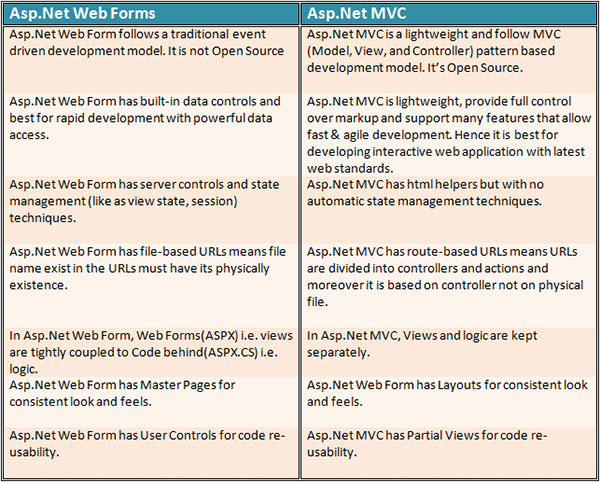
    MVC VS ASP 


    There are various positive points to Using MVC
    1.  TDD support out of the box as most of the design is based on interfaces.
    2.  SEO friendly URL by design (though now this is possible in ASP.NET 4 as well)
    3.  No ViewState (this may seem a bit of moving backward to some), but overall a good design    decision.
    4.  Clean View Markup (no additional HTML emitted)
    5.  100% extensible.  You can add your own controller with IOC, switch view engines at will, control model binding at wish etc.
    6.   Rich UI support (possible through client side JS libraries like jQuery UI and others).  Telerik has released some controls for MVC which includes Grid control as well (which are merely HTMLHelpers)
    7.  Session, JS, Ajax works.  Validation is even more powerful with DataAnnotations and jquery.
    8.  Is MVC faster?  Yes by default because of lack of viewstate and clean markup.  But performance is subject and MVC by design is more performant that traditional ASP.NET webforms (though webforms can be made as fast as required.
    9.  Out of the box support for mitigating antiforgery attacks and XSS vulnerability (though asp.net does has this to some extent)
    10.  Out of the box minimal IOC support.
    11.  Full control over rendered HTML
    12.  Pluggable architecture


    ***ASP.NET WebForms developers migrating to ASP.NET MVC initially feel a little uncomfortable because they are unable to find many key features that were available in WebForms approach. There are many questions comes to their minds like below:
    1. Web is still stateless but where is the Viewstate?
    2. Where is that Code behind file?
    3. What is that Razor syntax? Why I need it?
    4. Where to find Page_Load method? that is used to put code for almost every page.
    4. What about Binding and Rich Server Controls? Where these controls gone?

    In this article Define brief description about asp and mvc. ASP.NET MVC is part of the ASP.NET framework. This means that you can take advantage of the existing ASP.NET framework support for caching, security, session state, and Ajax. Millions of ASP.NET applications have been written with this technology so you know that the technology is mature and scalable.
    You can build an ASP.NET MVC application using any language supported by the .NET framework. Typically, when people think of a .NET language, they immediately think of static languages such as C# or Visual Basic .NET. Realize, however, that the .NET framework — with the inclusion of the Dynamic Language Runtime (DLR) — will soon support many of the most popular dynamic languages including Ruby (IronRuby), Python (IronPython), and JavaScript (Managed Jscript). For example, soon you will be able to build ASP.NET MVC applications with the Ruby language and you will be able to take advantage of all of the features of the .NET framework.
     Mvc LAnguage is more easy and faster and more efficient and easy to learn. 
    Read More
    • Share This:  
    •  Facebook
    •  Twitter
    •  Google+

    Tuesday, 21 March 2017

    Overview of CSS

      Unknown       02:09       CssOverview       No comments    

    What is CSS?

    CSS stands for Cascading Style Sheets

    CSS is used to describe the look and formatting of a document written in markup language. It provides an additional feature to HTML. It is generally used with HTML to change the style of web pages and user interfaces. It can also be used with any kind of XML documents including plain XML, SVG and XUL. CSS is used along with HTML and JavaScript in most websites to create user interfaces for web applications and user interfaces for many mobile applications.

    CSS is easy to learn and understand but it provides powerful control over the presentation of an HTML document. Most commonly, CSS is combined with the markup languages HTML or XHTML.

    • Styles define how to display HTML elements
    • Styles are normally stored in Style Sheets
    • Styles were added to HTML 4.0 to solve a problem
    • External Style Sheets can save you a lot of work
    • External Style Sheets are stored in CSS files
    • Multiple style definitions will cascade into one

    CSS Example
    body { background-color:white; }

    h1 { color:seagreen; text-align:left; }

    p { font-family:"Arial"; font-size:15px; }


    Styles Solve a Common Problem

    HTML tags were originally designed to define the content of a document. They were supposed to say "This is a header", "This is a paragraph", "This is a table", by using tags like <h1 > , <p > , <table > , and so on. The layout of the document was supposed to be taken care of by the browser, without using any formatting tags. As the two major browsers - Netscape and Internet Explorer - continued to add new HTML tags and attributes (like the <font < tag and the color attribute) to the original HTML specification, it became more and more difficult to create Web sites where the content of HTML documents was clearly separated from the document's presentation layout.

    Multiple Styles Will Cascade Into One
    Style sheets allow style information to be specified in many ways. Styles can be specified
    inside a single HTML element, inside the <head> element of an HTML page, or in an
    external CSS file. Even multiple external style sheets can be referenced inside a single
    HTML document.

    Cascading Order
    What style will be used when there is more than one style specified for an HTML
    element?
    Generally speaking we can say that all the styles will "cascade" into a new "virtual" style
    sheet by the following rules, where number four has the highest priority:
    1. Browser default
    2. External style sheet
    3. Internal style sheet (inside the <head> tag)
    4. Inline style (inside an HTML element)
    So, an inline style (inside an HTML element) has the highest priority, which means that it
    will override a style declared inside the <head> tag, in an external style sheet, or in a
    browser (a default value).

    Grouping
    You can group selectors. Separate each selector with a comma. In the example below we
    have grouped all the header elements. All header elements will be displayed in blue text
    color. You can grouping any tag of multiple like div, p, apply any element.in this example you can see only header.
    h1,h2,h3,h4,h5,h6
    {
    color: blue;
    }

     The class Selector

    With the class selector you can define different styles for the same type of HTML element.
    Say that you would like to have two types of paragraphs in your document: one rightaligned paragraph, and one center-aligned paragraph. Here is how you can do it with styles:
      p.right {
        text-align: right
      }
      p.center {
       text-align: center
      }
    You have to use the class attribute in your HTML document:
    <p class="right">
    This paragraph will be right-aligned.
    </p>
    <p class="center">
    This paragraph will be center-aligned.
    </p>


    Note: To apply more than one class per given element, the syntax is:
    <p class="center bold">
       This is a paragraph.
    </p>

    The paragraph above will be styled by the class "center" AND the class "bold". You can also omit the tag name in the selector to define a style that will be used by all HTML elements that have a certain class. In the example below, all HTML elements with class="center" will be center-aligned:

    .center {
    text-align: center
    }
    In the code below both the h1 element and the p element have class="center". This means that both elements will follow the rules in the ".center" selector:
     <h1 class="center">
      This heading will be center-aligned
     </h1>
     <p class="center">
      This paragraph will also be center-aligned.
     </p>

    Note-Do NOT start a class name with a number! It will not work in Mozilla/Firefox.

    Add Styles to Elements with Particular Attributes

    You can also apply styles to HTML elements with particular attributes.
    The style rule below will match all input elements that have a type attribute with a value
    of "text":
      input[type="text"] {
        background-color: blue
       }

    The id Selector

    You can also define styles for HTML elements with the id selector. The id selector is
    defined as a #.
    The style rule below will match the element that has an id attribute with a value of
    "green":
    #green {color: green}
    The style rule below will match the p element that has an id with a value of "para1":
    p#para1
    {
    text-align: center;
    color: gray;
    }
    Note : Do NOT start an ID name with a number! It will not work in Mozilla/Firefox.

    CSS Comments

    Comments are used to explain your code, and may help you when you edit the source
    code at a later date. A comment will be ignored by browsers. A CSS comment begins with
    "/*", and ends with "*/", like this:
    /* This is a commented line */
    p
    {
    text-align: center;
    /* This is another comment  line margin:3px*/
    color: blue;
    font-family: arial;
    }
    In thi Commented line and assign margin:3px css style ignored by browser because this line is commented
    Read More
    • Share This:  
    •  Facebook
    •  Twitter
    •  Google+

    Overview of HTML

      Unknown       01:23       HtmlOverview       No comments    

    What is HTML?

    First developed by Tim Berners-Lee in 1990. HTML is used to create electronic documents (called pages) that are displayed on the World Wide Web. Each page contains a series of connections to other pages called hyperlinks. Every web page you see on the Internet is written using one version of HTML code or another. HTML code ensures the proper formatting of text and images so that your Internet browser may display them as they are intended to look. Without HTML, a browser would not know how to display text as elements or load images or other elements. HTML also provides a basic structure of the page, upon which Cascading Style Sheets are overlaid to change its appearance. One could think of HTML as the bones (structure) of a web page, and CSS as its skin (appearance).

    HTML is a language for describing web pages.


    • HTML stands for Hyper Text Markup Language
    • HTML is not a programming language, it is a markup language
    • A markup language is a set of markup tags
    • HTML uses markup tags to describe web pages
    • HTML is easy to learn

    Example
    <!DOCTYPE html>
    <html>
    <body>
    <h1>Write Heading</h1>
    <p>Write Code.</p>

    </body>
    </html>

    HTML Element Syntax 

    •  An HTML element starts with a start tag / opening tag 
    • An HTML element ends with an end tag / closing tag 
    • The element content is everything between the start and the end tag 
    • Some HTML elements have empty content 
    • Empty elements are closed in the start tag 
    • Most HTML elements can have attributes

    HTML Headings

    Headings are defined with the <h1> to <h6> tags.
    <h1> defines the largest heading.
    <h6> defines the smallest heading.
    Example
    <h1>This is a heading </h1>
    <h2>This is a heading </h2>
    <h3>This is a heading </h3>
    Note: Browsers automatically adds an empty line before and after headings.

    Headings Are Important


    Use HTML headings for headings only.
    Don't use headings to make text BIG or bold.
    Search engines use your headings to index the structure and content of your web pages.
    Since users may skim your pages by its headings, it is important to use headings to show the document structure.
    H1 headings should be used as main headings, followed by H2 headings, then less important H3 headings, and so on.

    HTML Rules (Lines)

    The <hr/> tag is used to create an horizontal rule (line).
    Example
    <h1> This is a heading </h1>
    <h2> This is a heading </h2>
    <h3> This is a heading </h3>
    Note: Browsers automatically adds an empty line before and after headings.


    HTML Paragraphs
    Paragraphs are defined with the <p> tag.
    Example
    <p>This is a paragraph</p>
    <p>This is another paragraph</p>
    Note: Browsers automatically adds an empty line before and after paragraphs.

    Don't Forget the End Tag
    Most browsers will display HTML correctly even if you forget the end tag:
    Example
    <p>This is a paragraph
    <p>This is another paragraph
    The example above will work in most browsers, but don't rely on it. Forgetting the end tag can
    produce unexpected results or errors.
    Note: Future version of HTML will not allow you to skip end tags.

    HTML Line Breaks
    Use the <br /> tag if you want a line break (a new line) without starting a new paragraph:
    Example
    <p>This is<br />a para<br />graph with line breaks</p>
    The <br /> element is an empty HTML element. It has no end tag.
    <br> or <br />
    In XHTML, XML, and future versions of HTML, HTML elements with no end tag (closing tag)
    are not allowed.
    Even if <br> works in all browsers, writing <br /> instead is more future proof.
    HTML Output - Useful Tips
    You cannot be sure how HTML will be displayed. Large or small screens, and resized windows
    will create different results.
    With HTML, you cannot change the output by adding extra spaces or extra lines in your HTML
    code.
    The browser will remove extra spaces and extra lines when the page is displayed.
    Any number of lines count as one space, and any number of spaces count as one
    space.
    Read More
    • Share This:  
    •  Facebook
    •  Twitter
    •  Google+

    Friday, 17 March 2017

    What is LINQ

      Unknown       11:11       Introduction       No comments    

    LINQ (Language Integrated Query) is a Microsoft programming model and methodology that essentially adds formal query capabilities into Microsoft .NET-based programming languages. LINQ offers a compact, expressive, and intelligible syntax for manipulating data.

    SQL is a Structured Query Language used to save and retrieve data from a database. In the same way, LINQ is a structured query syntax built in C# and VB.NET used to save and retrieve data from different types of data sources like an Object Collection, SQL server database, XML, web service etc.

    Why use LINQ
    • Using LINQ reduces the amount of code to be written as compared with a more traditional approach. Using LINQ provides type checking of objects at compile time.
    • Using makes the code more readable so other developers can easily maintain and understand it.
    • Using LINQ provides IntelliSense for generic collections.
    • Developers don’t have to learn a new query language for each type of data format.


    In this artical Introduction to LINQ.It is a groundbreaking innovation in Visual Studio 2008 and the .NET Framework version 3.5 that bridges the gap between the world of objects and the world of data. You can use LINQ queries.
    Introduced in Visual Studio 2008 LINQ (Language Integrated Query) allows writing queries even without the knowledge of query languages like SQL, XML etc. LINQ queries can be written for diverse data types.Using linq query with lamda expression.
    Example
    public ActionResult LinqEx()
     {
     string[] Linqwords = {"Hi", "This", "is", "Testing", "Of linq","Example"
    }; //Get only short words
     var shortLinq = from word in Linqwords where word.Length <= 6 select word;
     //Print each word out
     foreach (var word in shortLinq)
     {
     var printword += word
     }
         ViewBag.Data= printword
        return View();
     }
    Note- In this example We create a controller and create a method actionresult type LinqEx name and define a string array and apply simple linq query.

    Syntax of LINQ

    There are two syntaxes of LINQ. These are the MEntion below like-

    Lamda (Method) Syntax


    Example
    var LinqWord = Linqwords.Where( w => w.length > 10);
    Note- In this example => is denoted lamda Expression

    Query (Comprehension) Syntax

    Example
    var LinqWord = from w in words where w.length > 10;
    Note- In this example use linq Query

    USE AUTOINCREMENT ID IN SQL SERVER 

    In this articale show auto increment column in table we usallycreated table then give id identity then 
    What is meaning and why we use? describe in exmple like-

    The following SQL statement defines the "ID" column to be an auto-increment primary key field in the "Category" table (Given Category is Table Name and CategoryId And  CategoryName are Field  in Table 

             Create table Category
                 (
                       CategoryId INT IDENTITY(1,1) Primary Key,
                       CategoryName NVARCHAR(100)     
                 )
      
    USE IDENTITY(1,1) in Table =
    Where the 1,1 is the starting number is 1 and increment  by 1 that's the resigon You can use Identity(1,1)


    In the example above, the starting value for IDENTITY is 1, and it will increment by 1 for each new record.
    Exp. To specify that the "ID" column should start at value 10 and increment by 5, change it to IDENTITY(10,5).
    Result-


       In This Following Image CategoryId Is Auto Increment And Id id Start with 1  and It Will 
        Increment By 1
        
      Use This Steps In Result-

      1. Create Table With Create Query.

      2. Insert Data With Insert Query.

      3.  Show Table Data Through Select Query in Sql Server.


    Read More
    • Share This:  
    •  Facebook
    •  Twitter
    •  Google+

    Thursday, 16 March 2017

    Overview

      Unknown       09:14       SQLOverview       No comments    

     SQL(Structured Query Language) 

    SQL is a language that interacts with the database on the server-side. This dynamite duo has changed the structure of the internet forever. Sure, programming languages like PHP, ASP, and ColdFusion made the internet dynamic, but the efficiency of SQL has revolutionized how user's interact with websites.

    What is SQL?

    SQL is Structured Query Language, which is a computer language for storing, manipulating and retrieving data stored in relational database.
    SQL is the standard language for Relation Database System. All relational database management systems like MySQL, MS Access, Oracle, Sybase, Informix, postgres and SQL Server use SQL as standard database language.

    Why SQL?


    • Allows users to access data in relational database management systems.
    • Allows users to describe the data.
    • Allows users to define the data in database and manipulate that data.
    • Allows to embed within other languages using SQL modules, libraries & pre-compilers.
    • Allows users to create and drop databases and tables.
    • Allows users to create view, stored procedure, functions in a database.
    • Allows users to set permissions on tables, procedures, and views

    What Can SQL do?

    • SQL can execute queries against a database
    • SQL can retrieve data from a database
    • SQL can insert records in a database
    • SQL can update records in a database
    • SQL can delete records from a database
    • SQL can create new databases
    • SQL can create new tables in a database
    • SQL can create stored procedures in a database
    • SQL can create views in a database
    • SQL can set permissions on tables, procedures, and views

    History

    • 1970 -- Dr. Edgar F. "Ted" Codd of IBM is known as the father of relational databases. He described a relational model for databases.
    • 1974 -- Structured Query Language appeared.
    • 1978 -- IBM worked to develop Codd's ideas and released a product named System/R.
    • 1986 -- IBM developed the first prototype of relational database and standardized by ANSI. The first relational database was released by Relational Software and its later becoming Oracle.

    What is RDBMS


    RDBMS stands for Relational Database Management System. Dbms is Acutaully just collection of file and store data in files, While RDBMS is store data in table format RDBMS is the basis for SQL, and for all modern database systems such as MS SQL Server, IBM DB2, Oracle, MySQL, and Microsoft Access. The data in RDBMS is stored in database objects called tables.

    What is Table ?

    Table is Basicaly Store Data in Rows and Columns format known as Table. Just a Collection of Rows and Columns.

    Constraints

    SQL constraints are used to specify rules for the data in a table. If there is any violation between the constraint and the data action, the action is aborted by the constraint. Constraints can be specified when the table is created (inside the CREATE TABLE statement) or after the table is created (inside the ALTER TABLE statement).

    Constraint Example.


    CREATE TABLE TableName
    (
    ColumnName1 data_type(size) ConstraintName,
    ColumnName2 data_type(size) ConstraintName,
    ....
    );

    Most Commanly used Constrainta see above-

    NOT NULL  -  Not Null Constraints Indicates that a column cannot store NULL value

    UNIQUE  - Unique key is that each row for a column must have a unique value

    PRIMARY KEY - Primary key is a combination of a NOT NULL and UNIQUE. Ensures that a column (or combination of two or more columns) have an unique identity which helps to find a particular record in a table more easily and quickly

    FOREIGN KEY - FOREIGN KEY is Ensure the referential integrity of the data in one table to match values in another table

    CHECK - Ensures that the value in a column meets a specific condition

    DEFAULT - DEFAULT Specifies Provide default value for a column when specified none for this column.
    Read More
    • Share This:  
    •  Facebook
    •  Twitter
    •  Google+

    Sunday, 5 March 2017

    Difference Between function v/s store procedure

      Unknown       10:10       FunctionVSSp       No comments    


    Definition of Store Procedure

    In a database management system (DBMS), a stored procedure is a set of Structured Query Language (SQL) statements with an assigned name that's stored in the database in compiled form so that it can be shared by a number of programs.

    Definition of Function

    A user-defined function is a Transact-SQL or common language runtime (CLR) routine that accepts parameters, performs an action, such as a complex calculation, and returns the result of that action as a value. The return value can either be a scalar (single) value or a table.   

    Difference Between Union vls Union All


    In this Artical here when using UNION vs UNION ALL, since the database server must do additional work to remove the duplicate rows, but usually you do not want the duplicates (especially when developing reports). Describe Union and union All see above -

    Union -

    In Sql server union use merge two and more select query. But you can take care about those query have equal number of columns and sequence of columns must be same both queries you include in union. Data type also same when apply union in both query. UNION performs a DISTINCT result , Removing any duplicate rows. It is slower than UNION ALL.

    SYNTEX

       SELECT COLUMN1,COLUMN2 FROM TABLE1
         UNION
       SELECT COLUMN1,COLUMN2 FROM TABLE2

    Ex.

    Create Table in Sql server

    CREATE TABLE TABLE1(
       Id int,
       Name nvarchar(50)
    )
    CREATE TABLE TABLE2(
       Id int,
       Name nvarchar(50)
    )
    Insert data in table
    Insert into TABLE1(Id,Name)values(1,'jeet')
    Insert into TABLE1(Id,Name)values(2,'Ranu')
    Insert into TABLE1(Id,Name)values(3,'jitendra')
    Insert into TABLE2(Id,Name)values(1,'Pulkit')
    Insert into TABLE2(Id,Name)values(2,'jeet')
    Insert into TABLE2(Id,Name)values(3,'Vijay')
    Select Both Query With select Command and apply union See in above example
    Example
    Select Name from Table1
    UNION
    Select Name from Table2
    Output-

    Union All-


    In Sql server union use merge two and more select query. Query have equal number of column and same data type. UNION ALL does not remove duplicates. Union All is fasterbthan union

    SYNTEX

       SELECT COLUMN1,COLUMN2 FROM TABLE1
         UNION
       SELECT COLUMN1,COLUMN2 FROM TABLE2

    Ex.

    Create table
    CRAETE TABLE TABLE1(
       Id int,
       Name nvarchar(50)
    )
    CRAETE TABLE TABLE2(
       Id int,
        Name nvarchar(50)
    )
    Insert data in table
    Insert into TABLE1(Id,Name)values(1,'jeet')
    Insert into TABLE1(Id,Name)values(2,'Ranu')
    Insert into TABLE1(Id,Name)values(3,'jitendra')
    Insert into TABLE1(Id,Name)values(1,'Pulkit')
    Insert into TABLE2(COLUMN1,COLUMN2)values(2,'jeet')
    Insert into TABLE2(COLUMN1,COLUMN2)values(3,'Vijay')
    Select Both Query with select Command and apply Union All see in above example
    Example
    Select Name from Table1
    UNION ALL
    Select Name from Table2
    Output-


    In this example you can understand easly difference between Union and Union all .Now Some points define differnces in union and union all See above-
    UNION UNION ALL
    Union eleminate all duplicate rows Union All not does not eleminate all duplicate rows. It is fatch all record with duplicay
    Union use distinct sort Union All does't Show distinct sort
    Union is slower than Union All Union all is faster than Union
    It is not work on columns that have text data type It is work on those column that have datatype text.
    Read More
    • Share This:  
    •  Facebook
    •  Twitter
    •  Google+

    What is Function in Sql Server

      Unknown       08:38       Function       No comments    

    A function is a block of code that has a name and it has a property that it is reusable. We use function in store Procedure and queries in sql server.

    We can define function like-
     User Define function - It is created by user and use in any query and SP also.
     System Define function- Most of the function define by System in SQL inbuilt function.

    SQL Function

    Scalar Functions

    Scalar functions is a function where it is return a single value. Below is the list of some useful Sql Server Scalar functions. UCASE()
    LCASE()
    ABS()
    RAND()
    ROUND()
    UPPER()
    LOWER()
    LTRIM()
    LEN()
    FORMAT()
    NOW()

    SQL Aggregate Function

    SQL Aggregate functions return a single value, calculated from values in a column.
        AVG()
       COUNT()
       SUM()
       MAX()
       MIN()

    Detail Discription as below with example

    AVG() - This function returns the average value of a numeric column in SQL Server.
    SELECT AVG(columnName) FROM TableName
    Example
    SELECT AVG(Salary) AS Salary FROM Customer

    We Create a Table Customer Insert Some Column Table look like as below -


    Created Table Customer and we apply AVG of Salary in Customer table then use AVG function and easily find avg of salary like-


    Note- In This Example Salary is ColumnName and Customer is TableName Find Avg of salary in customer table and see output as below-


    COUNT() - This function is used to count total number of value and return total row in SQL Server.

    SQL COUNT() Syntax-

            SELECT COUNT(columnName) FROM TableName

    Example
    SELECT COUNT(Salary) AS Salary FROM Customer

    Note- In This Example Salary is columnName and Customer is TableName Return total num of salary in customer table and see output as below-


    SUM() - This function is used to sum total number of value of the selected column  SQL Server.

    SQL SUM() Syntax-

        SELECT SUM(columnName) FROM TableName
    Example
    SELECT SUM(Salary) AS Salary FROM Customer

    Note- In This Example Salary is ColumnName and Customer is TableName Return Total SUM of salary in customer table and see output as below-


    MAX() - This function returns the Max or largest value of the selected column in SQL Server.

    SQL MAX() Syntax-

            SELECT MAX(columnName) FROM TableName
    Example
    SELECT MAX(Salary) AS Salary FROM Customer

    Note- In This Example Salary is ColumnName and Customer is TableName Return Maximum salary in customer table and see output as below-


    MIN() - This function returns the Minimum value of the selected column in SQL Server.

    SQL MIN() Syntax-

          SELECT MIN(columnName) FROM TableName
    Example
    SELECT MIN(Salary) AS Salary FROM Customer

    Note - In This Example Salary is ColumnName and Customer is TableName Return Minimum or smallest salary in customer table and see output as below-


    Read More
    • Share This:  
    •  Facebook
    •  Twitter
    •  Google+

    Saturday, 4 March 2017

    How To Create DataBase & Table in SQL Server

      Unknown       10:21       CreateDb       No comments    

    We Create Database in SQL Server
    Step 1.  Firstly open Computer and Click on SQL Server then Create DataBase.

    Step 1.  Write Query of creation of Database in Sql Server like this-

    Syntex
    CREATE DATABASE DATABASE_NAME

    Note- Here DATABASE_NAME is Created Database Name. Whatever u want to giveProper name
    of Database

    Ex.

    CREATE DATABASE Management

    Execute this query then Data base is created with Management name and we use tis data base then Write .

    Use DataBase_Name

    Ex.
    Use  Management
    Execute this query then we easly access this database and use for table and  also use store procedure and function also.

    CREATE Table in SQL.
    Syntex-
           Create Table Table_Name
             (
                ColumnName1
              )


    SQL Exmple-

          Create Table City
           (
              CityId Int IDENTITY(1,1) PRIMARY KEY,
              CityName NVARCHAR(200),
              CreateDate DATETIME Default GETDATE()
            )
       Note- Here "City" is Table Name and CityId ColumnName1 this is int  type and primary key and
    Set Identity (Increment by 1) and CityName is Name of City This is navrchar type give limit 200
    and last is CreateDate is Date  mention default GETDATE() means current Date in this DATETIME is datatype.


    Read More
    • Share This:  
    •  Facebook
    •  Twitter
    •  Google+

    SQL Select

      Unknown       10:01       Select       No comments    

    The SQL SELECT Statement

    The SELECT statement is used to select data from a database.

    SQL SELECT Syntax

    SELECT column_name,column_name
    FROM table_name;

    Ex.
    SELECT * FROM TABLE_NAME
    Note - This Query select All data in table from database.

    SQL SELECT DISTINCT

    The SELECT DISTINCT statement is used to return only distinct (different) values.
    In a table contain many duplicate values. and sometimes you only want to list the different (distinct) values.
    The DISTINCT keyword can be used to return only distinct (different) values.

    SQL SELECT DISTINCT Syntax

    SELECT DISTINCT column_name
    FROM table_name

    The following SQL statement selects only the distinct values from the "Name" columns from the "Master" table:

    Example

    SELECT DISTINCT Name FROM Master; 

    The SQL WHERE


    In Sql Select Query you want to apply Where condition then use this query and give condition whatever you want to apply. like example
    Syntax
    SELECT column1,column2 FROM TableName WHERE column_name operator value;
    Example
    Select EmpName,Salary from Employe
    EmpName Salary
    Jeet30000
    Ranu15000
    Pulkit10000
    Vijay12000

    Note - In This Select query select EmpName & Salary column name from Employe table ,execute this query then get all EmpName and according salary in Employe table, but You want those record according particular Empname and salary based then you apply where condition. like
    Example
    Select EmpName,Salary from Employe where Salary > 15000
    Output-
    Note- Filter according where condition and get result
    EmpName Salary
    Jeet30000

    SQL ORDER BY

    Select Query and you want to sort result by one or more columns then use order by in query like in example
    Syntax
    SELECT column1,column2 FROM TableName ORDRE BY column_name ASC|DESC

    Example
    SELECT EmpName,Salary from Employe ORDER BY EmpName DESC
    EmpName Salary
    Vijay12000
    Ranu15000
    Pulkit10000
    Jeet30000
    Note-In this example record sort by descending ordre by EempName. if you not give DESC keyword then sorts the records in ascending order by default,

    SQL AND & OR Operators


    In this artical describe The AND & OR operators. This operators are used to filter records based on more than one condition. AND Operator- Apply this Operator displays a record if both the first condition AND the second condition are true.Both condition are mandatory true
    Syntax
    SELECT column1,column2 FROM TableName WHERE Condition1 AND condition2

    Example
    Select EmpName,Salary from Employe where Salary > 15000 AND Salary = 30000
    Output-
    Note- Filter according where condition and get result
    EmpName Salary
    Jeet30000
    Notes - In this example both condition true salary is grater then 15000 and equal to 30000 both condition match and return result So we use and condition

    OR Operator


    OR Operator- Apply this Operator displays a record if either the first condition AND the second condition is true.
    Example
    Select EmpName,Salary from Employe where Salary > 15000 OR Salary < 40000
    Output-
    Note- Filter according where condition and get result
    EmpName Salary
    Jeet30000
    Note- Apply OR condition where salary is greater then 15000 and less then 40000 and return sql result.

    Combining AND & OR


    You can also combine AND and OR (use parenthesis to form complex expressions).
    Example
    Select EmpName,Salary from Employe where EmpName='Jeet' AND (Salary > 15000 OR Salary < 40000)
    Output-
    Note- Filter according where condition and get result
    EmpName Salary
    Jeet30000
    The following SQL statement selects all Employe record from the EmpName "Jeet" AND the Salary must be greater than to "15000" OR less than "40000", in the "Employe" table:
    Read More
    • Share This:  
    •  Facebook
    •  Twitter
    •  Google+
    Newer Posts Older Posts Home

    learningmvctutorial

    Popular Posts

    • Overview
        SQL (Structured Query Language)   SQL  is a language that interacts with the database on the server-side. This dynamite duo has changed ...
    • Overview of HTML
      What is HTML? First developed by Tim Berners-Lee in 1990 . HTML is used to create electronic documents (called pages) that are displ...
    • Difference Between function v/s store procedure
      Definition  of Store Procedure In a database management system (DBMS), a  stored procedure  is a set of Structured Query Language (SQL...
    • SQL Select
      The SQL SELECT Statement The SELECT statement is used to select data from a database. SQL SELECT Syntax SELECT column_name , column_n...
    • What is LINQ
      LINQ  (Language Integrated Query) is a Microsoft programming model and methodology that essentially adds formal query capabilities into Mic...
    • What is Function in Sql Server
      A function is a block of code that has a name and it has a property that it is reusable. We use function in store Procedure and queries in...
    • Create Duplicate Table of existing table in SQL Server
      In This Tutorial we create table and want to same structure and same data then We create new table with data type after that  insert in ta...
    • About Javascript
      What is JavaScript? JavaScript was designed to add interactivity to HTML pages JavaScript is a scripting language A scripting langua...
    • Operator in JavaScript
      What is an operator? JavaScript has both binary and unary operators, and one special ternary operator, the conditional operator. A binar...
    • Open Application in MVC
      We want to create application in MVC first of how we create first application Show Steps   as below-     STEP 1 .  Start Computer and  I...

    Blog Archive

    • ▼  2017 ( 35 )
      • ►  November ( 1 )
      • ►  October ( 2 )
      • ►  September ( 4 )
      • ►  August ( 1 )
      • ►  July ( 1 )
      • ►  May ( 3 )
      • ►  April ( 7 )
      • ▼  March ( 13 )
        • What Is Store Procedure
        • Create First Application in MVC
        • How To Install Visual Stdio Step by Step Process
        • Overview of CSS
        • Overview of HTML
        • What is LINQ
        • Overview
        • Difference Between function v/s store procedure
        • What is Function in Sql Server
        • How To Create DataBase & Table in SQL Server
        • SQL Select
        • Open Application in MVC
        • MVC OverView
      • ►  February ( 3 )
    Powered by Blogger.

    Categories

    • AdvanceQuery
    • CreateApplication
    • CreateDb
    • CssOverview
    • Evolution
    • Formatting
    • Function
    • FunctionVSSp
    • HtmlOverview
    • InstallVisualStudio
    • Introduction
    • javascriptOverview
    • JsValidation
    • Mvc-vs-Asp.Net
    • OverView
    • Select
    • SqlCommand
    • SQLOverview
    • StoredProcedures

    Text Widget

    Sample Text

    Pages

    • Home

    Copyright © MVC | Powered by Blogger
    Design by Vibha Acharya